
↓
 

Brent's World

Your weekly dose of the life of Brent!

  • Home
  • About Me
  • Korea
  • Travel
  • Restaurants
  • Photography
  • Movie Reviews
  • Book Reviews
  • Recipies
  • Index
  • Forums
Home - Page 18 << 1 2 … 16 17 18 19 >>

Post navigation

← Older posts
Newer posts →

Killing a stuck process in RHEL / CENTOS Linux

Brent's World Posted on October 1, 2014 by Brent HendricksSeptember 24, 2014

Blog - Centos

Performing a w (Who is logged in command) we see our currently process that we logged on, at 03:36. Above that is a process that has been idle for 20 hours.. Obviously this is a hung or “stuck” process. How do we find the process, and kill it?


Example 1-1

03:36:17 up 1 day, 9:49, 2 users, load average: 0.06, 0.10, 0.04
USER TTY FROM LOGIN@ IDLE JCPU PCPU WHAT
user1 pts/0 000.000.0.00 Mon06 20:38m 39:55 39:52 htop
user1 pts/1 000.000.0.00 03:36 0.00s 1.24s 0.12s w
[user1@blog ~]$

There are two ways we can find this process. If you look at the example above, you can see that the process that has been left running is ‘htop’

So if we perform a process list, and search for ‘htop’ using the grep command, we should be able to locate the process and get it’s process ID ‘PID’

HINT: I would always use SUDO here, to make sure you are able to see all processes.

Example 1 – 2 (ps output)
[user1@blog ~]$ sudo ps -ef | grep htop
[sudo] password for user1:
user1 4444 4308 3 Sep22 pts/0 00:40:04 htop
user1 7694 7648 1 03:42 pts/1 00:00:00 grep htop

You see that grep found two incidences of htop during the output of the ‘ps’ command, we can ignore the incidence on the bottom as that was the grep process we just spawned. The entry on the top is the one we are interested in.

Now that we know the PID ‘4444’ we can issue the kill command and terminate the process.

[user1@blog ~]$ sudo kill 4444
(There should be no output returned)

Now let’s issue the ps –ef | grep htop command again, to verify that it has been killed. You could also use the ‘w’ command instead.

Example 1 -3
User1 7968 7648 1 03:48 pts/1 00:00:00 grep htop

Remember, we can ignore this, as this is us using ‘grep’ to find htop. As you can see the process has been killed.

You can also find the PID by grepping for the terminal # or username of the user running the stuck processes.

Example 2-1 (ps –ef) – Searched by username $ sudo ps -ef | grep user01

root 4301 1625 0 Sep22 ? 00:00:02 sshd: user01 [priv]
user01 4307 4301 0 Sep22 ? 00:07:38 sshd: user01@pts/1
user01 4307 0 03:36 pts/1 00:00:06 -bash
user01 7984 7648 0 03:51 pts/1 00:00:00 ps -ef
user01 7985 7648 0 03:51 pts/1 00:00:00 grep user01

Example 3-1 (ps –ef) – Searched by terminal # ‘pts/1’ $ sudo ps -ef | grep user01

user01 4307 4301 0 Sep22 ? 00:07:38 sshd: user01@pts/1
user01 7648 4307 0 03:36 pts/1 00:00:07 -bash
user01 7648 0 03:52 pts/1 00:00:00 ps -ef
user01 7992 7648 0 03:52 pts/1 00:00:00 grep pts/1

HINT: You can use the kill command to terminate the session of a user. If you look at the examples above, notice the process sshd: ? If you terminate this process it will effectively terminate the session of the user. Observe.

[user01@blog ~]$ sudo kill 4307
[sudo] password for user01:

<Your ‘SECURE SHELL’ connection has terminated>
Posted in Technical | Leave a reply

Installing OS X 10.9 as a WM Ware 10 Virtual Host

Brent's World Posted on September 14, 2014 by Brent HendricksSeptember 14, 2014

Installing OS X 10.9 Mavericks as a VM WARE 10.0 Host

I have been pretty quiet about the fact that I have switched from using a 2008 3.0GHz 8 Core Mac Pro to a Dell Optiplex 9020 running Windows 7 Ultimate. This is only the  second time that  I have used a Windows computer as my primary workstation.

Why did I make the switch? I have nothing against Apple, I think they make a great product that far outlasts their competition as far as useable performance. I love the OS X operating system, it’s fast, and extremely stable, and did everything that I needed it to do. However Apple has made some changes to their hardware and software line that I could no longer support. The first being the new Mac Pro. The main reason I saved up and spent so much money on the professional level Mac desktop was for the internal expansion that it offers. The new Mac Pro removes itself from being a viable workstation replacement for be because it does not offer internal expandability. I have 4 hard drive filled with photos and video, and I do not want to lose them, nor do I want the rats next that having 4 external hard drive chassis will create. Not to mention you cannot use boot camp on an external drive. The 2nd and final nail in the coffin was the decision to kill of Aperture. Which is the photo management software I have been using for the last 5 years. While I have not yet seen the replacement photo.app, I do not see how it will offer the same speed and flexibility as Aperture. I do not want iPhoto with more features. I figured that if I have to switch to Adobe Lightroom I might as well try something completely different.

As OS X was not one of the reasons that pushed me away from the Apple Camp, I would still like to play around with it, and review the odd software from time to time. I am a big proponent of Virtual Machines, and have several with various version of Linux, Windows 8.1, etc. So I got to thinking wouldn’t it be great if there was a way to run Mac OS X as a virtual host through VMWARE..

So out to Google I go, and what do you know!! I found this blog article that describes a VMware patch that does exactly that! http://www.sysprobs.com/vmware-workstation-8-0-8-0-1-unlocker-to-run-mac-os-x-guest-in-windows-7

I wanted to find out if it works! So off I went to http://www.insanelymac.com/forum/files/file/20-vmware-unlocker-for-os-x/ and downloaded the file (I had to register first.), and downloaded and saved the file to my hard drive. Once downloaded it was simply a matter of opening the .zip file and running the patch in a command window as Administrator. Here is a screen shot showing the selectable OS Types in VMware 10.0 before and after installing the patch.

VM Ware Workstation 10.0 Before Patch.

VM Ware Workstation 10.0 Before Patch.

VM Ware Workstation 10.0 After Applying The Patch.

VM Ware Workstation 10.0 After Applying The Patch.


So let’s go through installing OS X as a VM Ware 10.0 guest OS on Windows.

1) Install patch
2) Launch WMware 10.0
3) Select File > New Virtual Machine (CTRL + N)
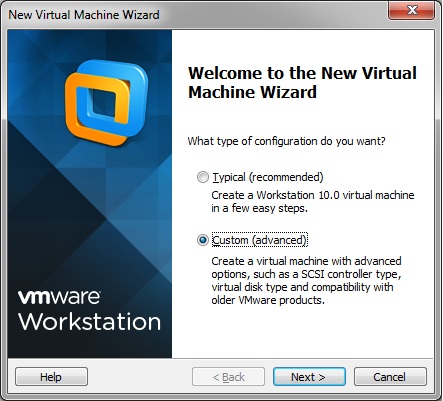
4) I always use Custom Mode when creating Virtual Machines

Custom Install


\

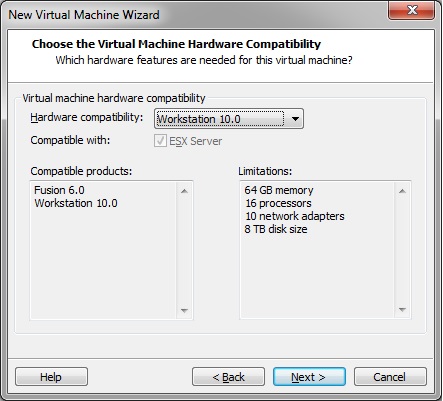
5) Keep the defaults and click Next

Keep Defaults


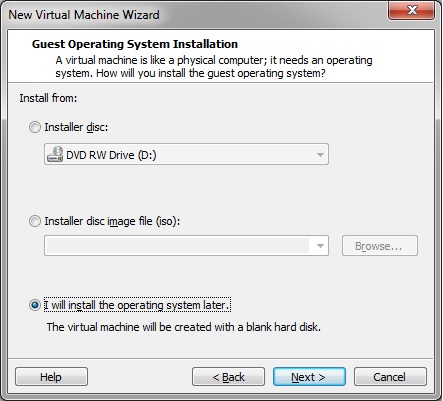
6) Select I will install the operating system later. – Click Next

OS Later


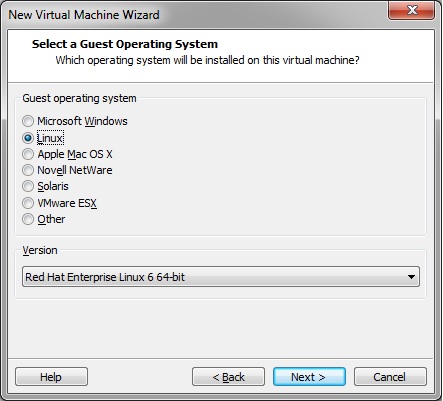
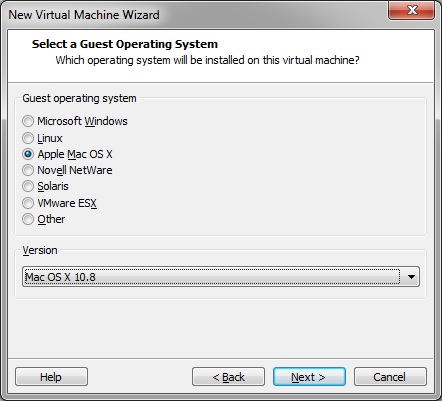
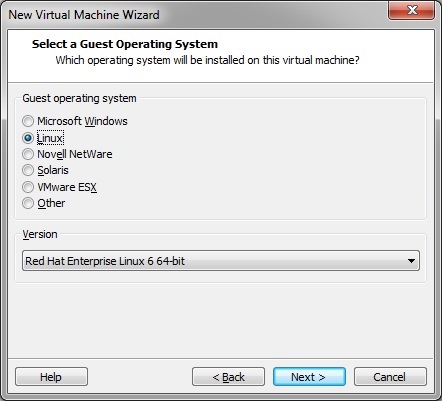
7) Select Apple Mac OS X under Guest operating system, and the version of Mac OS X you are going to install (I only have a 10.8 DVD, so I will choose 10.8 here.) – Click Next

Choose guest


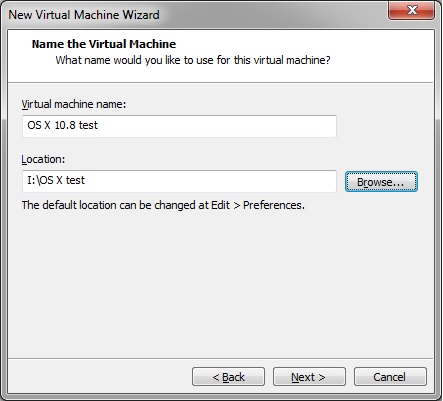
8) Name the Virtual Machine – OS X 10.8 test

Name Guest


9) Choose the location of the virtual machine.


10) Click Next

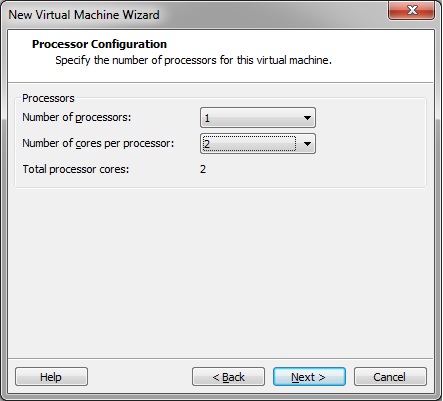
11) Choose the number of Processors and the number of cores (1 processor and 2 cores sounds good)

Processor and core


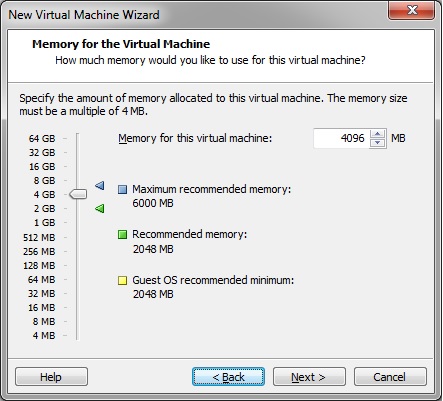
12) Select the amount of RAM, I am going to put 4 GBs here. The more RAM you have in the host computer, the more RAM you can put here.

RAM


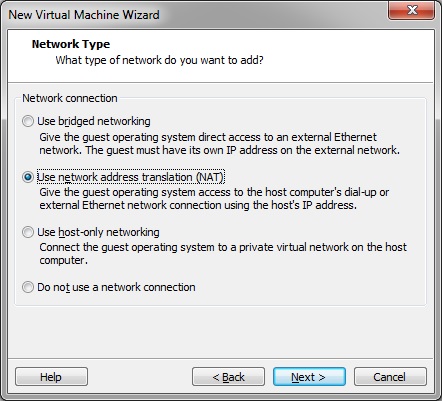
13) For networking we will use bridged networking. This will allow our virtual box to get it’s own IP address. This is important if you are going to be hosting any services from the Mac Guest OS. You can also just leave this in NAT mode. However I like to have a little bit more control over my virtual hosts.

Networking

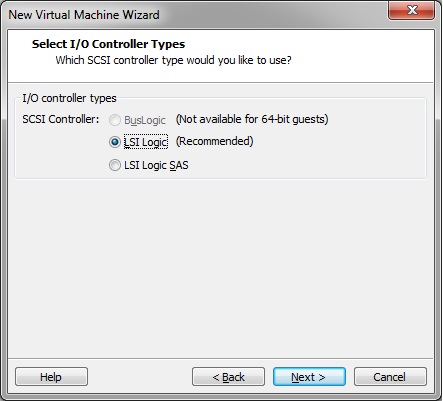
1


4) Just leave this as default. Click Next

IO Type


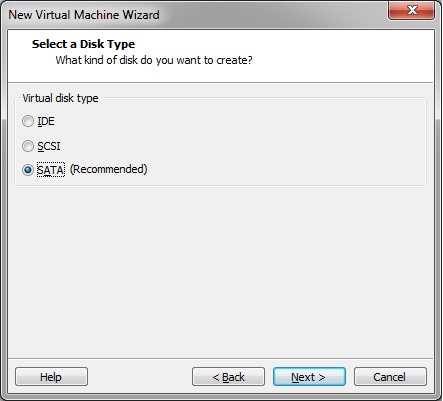
15) Leave this as default. Click Next

SATA


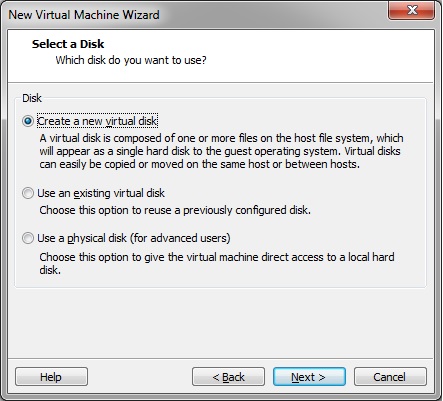
16) Select Create a new virtual disk. Click Next

New Disk


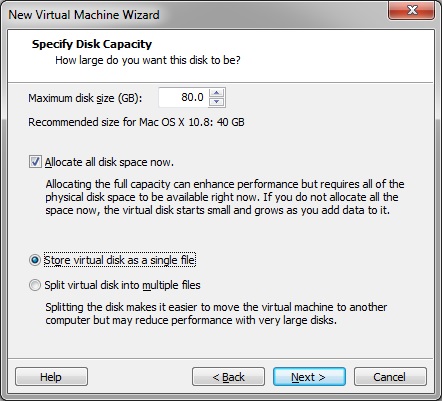
17) Create an 80GB Virtual Disk, Allocate all disk space now, and Store virtual disk in a single file. Click Next

Hard Disk settings


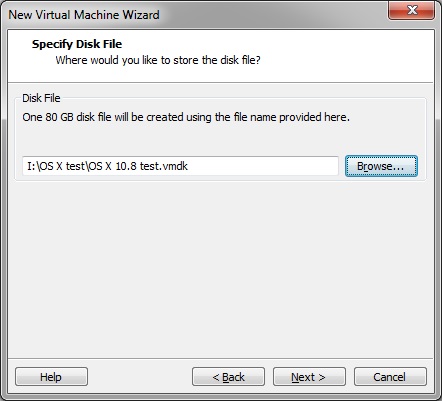
18) Verify the drive path, keep the default name, and click next

Hard Disk file path


19) Verify All settings and click Finnish. You will not have to wait while the 80GB Hard drive file is created. This will take a while, so go get a cup of coffee.


20) That’s it. Now all you have to do, is insert your OS X Install Disk, and Power On Your Virtual Machine!

Configure you Virtual OS X 10.8 workstation as you would a normal Mac,  then update to Mac OS X 10.9.


** I had to install OS X 10.8 then upgrade to Mavericks, as I did not have a 10.9 install disk.


Posted in Technical | 2 Replies

Brent’s World Quickie: Bermuda Style Baked Cod

Brent's World Posted on September 12, 2014 by Brent HendricksMay 26, 2020

Bermuda Style Baked Cod (1 of 1)

Brent’s World Quickie – Bermuda Style Baked Cod

(Source: www.cooks.com)

 Ingredients:

1lb package of fresh Cod (You can substitute with frozen fish if needed)
2 tbsp. butter
½ Minced med. Onion
½ cup Shredded Cheddar cheese
½ cup + 2 tbsp. milk
¼ cup seasoned bread crumbsSalt and pepper to taste

Directions: Preheat oven to 350 degrees, sauté onions in 2 tablespoons butter or olive oil. Mix with bread crumbs, cheese, salt and pepper.  Place fish in buttered baking dish.  Pour milk over fish.  Top with bread crumbs, onion, cheese mixture.  Bake 40 minutes at 350 Degrees.

Serve with Rice or potatoes, with vegetables.

Posted in Recipies | Leave a reply

Brent’s World Ice Bucket Challenge

Brent's World Posted on August 30, 2014 by Brent HendricksAugust 29, 2014

We Donated!Since Kai Man Won, and Lok Cheung from DigitalRev, one of my favorite photography and social media websites  (click here to read my previous review of their site.)  both took the ALS Ice Bucket Challenge.  I decided that I too would take part in this great fundraising effort for ALS research.

It would also give me a chance to try a multiple camera shoot, practice some high speed photography. In addition to planning, directing, and editing a video production.

ALS – Amyotrophic lateral sclerosis, also known as Lou Gehrig’s Diseas (After the famous baseball player) affects rought 30,000 Americans, with approximately  5,000 new cases being diagnosed each year. ALS is a fatal degenerative muscle disorder, that results in the loss of voluntary and eventualy involuntary muscle movement. The average time from diagnosis to death by ALS is usually about 36 months, with only a 4% survival rate longer than 10 years.

What is the ICE BUCKET Challenge?  The premise of the challenge is that participants take *Contiguous video of them pouring a bucket of ice water over their head in order to raise the awareness of ALS.  After pouring the bucket of ice water over their head, the challenger will then challenge someone they know to also take the challenge.

There are 2 versions of the challenge that I am aware of, the first being if you accept the challenge by pouring the bucket of ice water over your head, you are to donate $10 to ALS research.  If you choose to not take the challenge you are to donate $100.  The second version being you only donate if you decide to not take the challenge.  however this is criticized as not being in the spirit of the original intent of the challenge.

Here I am taking the ALS Ice Bucket Challenge.

* The video and photos were not taken in 1 take!  As this was largely an exercise in photography, 3 takes were used (We only got all 3 takes with the photo camera , as there was a technical problem with the 7D during the last 2 takes.)  However, roughly the same amount of ice was used in all three takes.

** Because we bent the above rules, I felt that it was only fair to donate $25 (PER TAKE) so Brent’s World donated a total of $75 for ALS research.

How did this improve my photography?

I found that I am not a very good director, the preparation and setup went Title (1 of 1)according to my idea, but due to difficulty communicating what I was envisioning, I made the person on the other side of the camera very self conscious and mistakes were made.  Camera shyness isn’t always about the person who is having their picture taken.  If you are lending your camera to someone.  Regardless if they know you well or are a complete stranger.  Always maintain good composure and be patient when trying to explain to them what you want done and how to do it.

Second.  While I do think I got some OK shots, I ended up doing it ass backwards.  I intended to use my Canon Speedlight to freezes the motion.  I found the flash does not recycle fast enough to use in burst mode AT ALL!  I also had the camera settings reversed from what I should have been using.  Instead of using a very narrow aperture, low shutter speed and using the Ice Bucket 4 (1 of 1)flash to freeze the motion.  I used a fast shutter speed, and a middle of the road aperture of about f5.


I lost allot of clarity on the water by not stooping the lens down to about f9 . I should have also planned more then 3 takes.  Though supposedly the store had run out of ice.  2 bags was all we had.  The next heat wave, I should stock pile ice for a week and see if I can get this down.


Video was a disaster!!  Another reason to have planned on more than 3 takes.  I should have shot the photos first, then gone back and take video.  I thought that since the video Ice Bucket 2 (1 of 1)pretty much would take care of itself, I could just start it and forget it.  Good ol Murphy showed up, and I was lucky to get away with 1 video out of 2 takes, Of course it also  helps if you remember the name of the people you are going to challenge!

So things could have turned out better, but in the end I mostly had fun with the project, when you do something like this it is more about you breaking from the mold of what you do day in and day out with your camera.  So the learning experience is what is important, you are helping a good cause and that is just icing on the cake!

Thanks for reading!  Enjoy your camera!


Posted in Blog News, Korea | Leave a reply

Brent’s World Quickie – Register with us!

Brent's World Posted on August 13, 2014 by Brent HendricksAugust 13, 2014

Brent’s World Quickie: How to register with Brent’s World

Have you found several interesting articles on Brent’s World? Do you want to be notified when a new article is posted? If the answer is Yes! Then all you have to do is register your email address with us and you will receive an automated email whenever new content is added.  Brent’s World will never send you SPAM, or share your email address with anyone!

Never again miss our informative articles on

 * Life and travel in Korea
 * Korean restaurant reviews
 * Photography tips and gear reviews
 * The latest in technology and great tips on
 * Linux and Unix Operating System
 * Apple and PC products
 * Movie Reviews
 * Quick and simple recipes.

There really is something for everyone at Brent’s World.

Register today!

1 – Open your web browser, and go to www.catracing.org/hendrb/wp-login.php

Register

2 – Click on the Register link in the lower right hand corner

3 – Enter the username you want to use on the blog (ie: qqquickie)

4 – Enter a valid email address.

5 – Click the Register button.

Registering

An email will be sent to the email address entered in step 4.

Email6 – Click on the link in the email and enter your Temporary Password (Hint: Copy and Paste from the email to prevent mistakes)

7 – You will then be asked to complete your user profile. Fill as much information as you desire (Note: a valid email address is required).

Biographical DataEntering a new STRONG password here is mandatory!

PasswordStrong Password Hint – Enter at least 8 Characters, 1 should be a capital letter, 1 should be number, and 1 should be a symbol such as a punctuation mark. For an even stronger password. Do not use words normally found in a dictionary.
I hope you enjoy Brent’s World, and if you have any suggestions that would make your visits to my site more enjoyable, please do not hesitate to send me feedback.

8 – Once you have completed updating your biographical information, and chosen a new password click the Update Profile button.

CONGRATULATIONS, you are now a registered member of Brent’s World!

Posted in Blog News, Technical | Leave a reply

Brent’s World Quickie: Baked Halibut w/ Creamy Dill Sauce

Brent's World Posted on July 30, 2014 by Brent HendricksMay 26, 2020

A Brent’s World Quickie: Baked Halibut With a Creamy Dill Sauce

Here is a great recipe for a romantic dinner for 2 or entertaining company.

photo


Ingrediants

2 or 4 (8 ounce) halibut Steaks ½ inch thick
Olive Oil
Salt and pepper
1 tablespoon butter
1 shallot (Finely chopped)
¾ cup heavy cream
2 TBSP fresh chopped dill or 2 tsp dried dill weed
1 TBSP fresh parsley.

 Directions: Pre-Heat oven to 420 degrees.  Brush halibut fillets with olive oil and sprinkle with salt and pepper.  Arrange in a lightly greased baking dish; bake for 15 to 20 minutes, or until halibut is cooked through and flakes easily with a fork.

While the halibut is baking heat butter and sauté shallot until tender, Add Cream, dill, parsley, and salt and pepper to taste.  Bring to a boil.  Serve the sauce over the baked halibut.

When you try this recipe, please come back and comment!

Don’t miss out on great articles from Brent’s World!  Register today.
Go to https://www.catracing.org/hendrb/wp-login.php?action=register


Source: Recipe originally from Diana Rattray, from about.com
http://southernfood.about.com/od/halibutrecipes/r/bl70615b.htm

Posted in Recipies | Leave a reply

Quickie – Changing Default Microsoft Word 2013 Documents To Single Space.

Brent's World Posted on July 23, 2014 by Brent HendricksOctober 13, 2015

A Brent’s World Quickie:  Single Spaced Documents in Microsoft Word 2013 By Default.

Do you use Microsoft Word 2013?  Are you annoyed by the fact that the default document style double spaces your documents?

Like this?

Here is a quick and easy way to change your normal document template to single space by default.

– Click on the Design Tab

Word - Design Tab


– Over on the right hand side, Click on Paragraph Spacing, and select No Paragraph space.


Word - Paragraph Spaceing


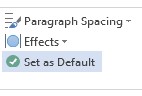
– Next Select ‘Set As Default’

Word 2013 Set As Default

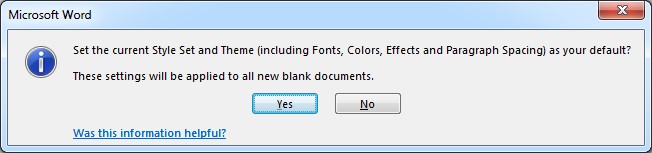
– Click Yes to accept as your new Normal default.

Word - Accept Default

This Quick Technical Tip was brought to your by Brent’s World!  For more ‘quickies’ and other great articles.  .  Don’t forget to comment or subscribe by going to www.catracing.org/wp-login.php?action=register


Posted in Technical | 1 Reply

Movie Review: A Woman, A Gun, And Noodle Shop

Brent's World Posted on July 14, 2014 by Brent HendricksAugust 1, 2014

A Woman, A Gun, And A Noodle Shop

AWAGANNS This weekend we sat down and watched A Woman, A Gun, And A Noodle Shop which I had bought a while ago on Amazon but for some reason just kept putting off watching.  This film was directed by the acclaimed Chinese director Zhang Yimou and released in 2009.  Yimou is famous for such works as Raise The Red Lantern, To Live, Shanghai Triad, and also directing the opening and closing ceremonies of the Beijing Olyimpics.  Yimou is best known for the shocking and over the top use of color and static shots in his cinematic works.

A Woman, A Gun, And A Noodle Shop, was adapted from John and Ethan Coen’s “Blood Simple”, which I watched for the first time a couple of weekends ago.   If I had to make the decision over again I would have watched Zhang Yimous version first, not because I think A Woman, A Gun, And A Noodle shop is superior, but the story was similar enough (More on that below), that I think I would have been able to focus more on what Zhang Yimou is famous for, and not on that fact that for the most part I just so recently watched this film.

The film stars Dahong Ni as Wang, the rich owner of a popular noodle shop, and Ni Yan his abused wife.  Wang is angry that his wife, whom he had bought 10 years ago has not been able to bear him a son and  takes it out on her daily with both physical and emotional abuse.

The wife meanwhile is having an affair with one of Wang’s employee’s which sets the stage for the Shakespearian plot that ensues.  As stated above this film was based on the Coen’s movie Blood Simply.  So much so, that except for being based in Feudal China instead of 1970s Texas it is pretty much the same movie.   I was once again awestruck by Yimous choice of colorful wide angle shots.  His cinematography skills really are second to none.   You are also treated to several very rare scenes were an ultra-wide angle lens is used, not just to get all the landscape in one shot, but as it’s intended purpose in still photography.  To get REALLY close to a particular subject,  including the background and exaggerating perspective.   I cannot remember a film that used a wide angel to that effect before.  The other main difference was this film seemed to be much brighter than the original.  Blood Simple in itself was shot just a tad brighter than the Noire genre that it was emulating.  Also the fact that Blood Simple was shot in color when most Noire films have been black and white set it apart.  Giving that to Yimou to play with and this film shines brighter still.

I agree with the IMDB user rating of 5.7, as it was a good film, the cinematography was excellent and definitely up to Zhang Yimous standards.  However I found the movie too similar to the work it was copying, there was nothing new here.  There was more comedy added, that’s for sure. However not enough to separate itself from the original.   Some critics wondered why a seasoned and already renowned cinematographer took on this project.  With no real new original material in the film it is easy to question when one might see this more as a film school project.   If I had to guess, I would say it was all about taking the little things that made the original stand out and carrying them just a little bit further and sometimes over the top. , both in style, color, and comedy.   If you have never seen the original by the Coen Brothers, by all means see this film.  If you have seen the original, than it’s up to you.   Enjoy a good story, by a great director.  Just don’t expect feeling like you have seen anything new.   It is however still better than the cinematic re-launches coming out of Hollywood recently.


Feel free to leave me a comment, letting me know what you thought of the film, or if this review has made you interested in seeing the film what you thought afterwards.

Posted in Movie Reviews | Leave a reply

Apple Announces The End Of The Line For Aperture

Brent's World Posted on July 8, 2014 by Brent HendricksJune 19, 2018

imagesApple  Announces The End Of Aperture, And I’m Worried.

I have been using and promoting the use of Aperture since purchasing my first digital camera in 2007, looking back its hard to believe that is over 7 years ago. My how time flies.   What originally drew me to Aperture was that at the time it was the easiest and most advanced way of working with RAW Files.  Way back when I used a 35mm Canon EOS, I shot mostly slide film. So to me the decision to use RAW was pretty easy for me.

I have tried several times to switch to Adobe Lightroom, which I will admit has several advantages over Aperture, such as built in lens correction profiles, chromatic aberration correction, and multi touch brushes. What Lightroom does not hold a candle to is the speed of importing photos, the processing and display of slide shows on the fly, photo printing options, and what I think is a superior layout and workflow.

While Apple has promised that the new Photos.app will be fully compatible with my libraries and that it isn’t abandoning it’s pro users. It makes me wonder just how much pain is in store going down this road. Remembering the pain the pro video crowd suffered during the initial days of Final Cut Pro X. How much no frills functionality will I have to sacrifice for form just to please the mainstream consumer crowd?

One other thing that I am sure is weighing heavily on the minds of the real professionals (by real professionals I mean people who make their living with their camera’s and post production suites.), the people who choose an Apple’s product to build their workflow around are once again being forced to adapt to a completely different application. One that from what I saw is being marketed mainly towards consumers. If I’m questioning if I should have bit the bullet and just stuck with lightroom when I was evaluating “switching” I am sure others are as well. At least we would have a stable product pipeline.

Only time will tell, if the announced 6 month wait for the new Photos.app will be what we we’re hoping and waiting for with an update to Aperture, or will it spell the end of Apple’s involvement with professional photography work flow? Is this worth it just for iCloud support?


RIP Aperture –

Posted in Technical | Leave a reply

REPOST: DigitalRev

Brent's World Posted on July 7, 2014 by Brent HendricksAugust 1, 2014

And Now For Something Different: Website review – DigitalRev


If you have been following my blog, you have realized that I try to follow a format as to the type of articles that I am writing. I have been trying to write articles fall into the following category’s


1)     Out And About In Korea: These are informative articles on the sites, and recreational activities that I enjoy doing to get out of the house , or special events and festivals that take place in The Land Of The Morning Calm. These articles can also be used as a travel guide if you ever plan on visiting.

2)     Technical Blogs: These are centered on the Unix (OS X) and Linux operating system and take a look at best operating and administrative practices.

3)     Restaurant reviews: These take at look restaurants that Mi Jung and myself visit, which can also be used as a guide on the best places to eat or in some cases avoid if you’re planning a trip to Korea.

4)     Movie Reviews: These review main stream releases, or Asian films that I have seen. If you have never sat down to watch Asian Cinema you can use these to device which ones to watch, and which ones to steer clear of.

I have tried to write at least one blog a week, with a release before Sunday. Since I am behind on my blog writing I thought I would do something a bit different and do a review on a website, or more accurately, a Social Media site, online store online store, and Youtube channel that I have found myself hooked on.

 Digitalrev, www.digitalrev.com
 DigitalRev TV http://www.youtube.com/user/DigitalRevCom

According to Wikipedia, the DigitalRev TV video blog started in 2007, by producer Richard Yu, aka “The Bloody Producer”, aka “Mr. Hands” and featured “just a lone reviewer’s hands showing the viewers the perks of each photography product”. In 2009, with the arrival of Kai W (Kai Man Wong), the format  changed to what you see on the channel now. Witty, sarcastic and sometimes irreverent reviews of the latest in camera gadgetry, AKA “Camera Porn.”.

The video blog also serve as a review tool, to sell products on DigitalRevs online camera store. While I have not purchased any equipment from them, as I am already a dedicated customer of BHPhoto Video in New York, I would have no hesitation to “give them a go.”

One of the elements that draws me to their site, is the fact that instead of simply watching someone drone on about the features of a specific camera, lens, or a new photography technique ( Check out their videos on levitation photography, or if you’re in the mood for some heart pounding action, “camera abuse”. Check out the durability test of the Canon EOS 7D, or the video on “Camera Tossing”). As the owner of a Canon EOS 5D MKIII I can honestly tell you my heart stopped when imagining my prized possession being tossed in the air like a teddy bear!

Another favorite series, is the Protog – Cheap camera challenge. These episodes feature world renowned photographers challenged to come to Hong Kong to shoot professional photos with “cheap” gear. Featured victims/protogs include Chase Jarvis who has to take action photos with a Lego Camera. Or Phillip Bloom who has to plan, direct, and film a movie with a Barbie camera. Which is an extremely fun way of proving the point that it doesn’t matter what gear you have. If you have patience, talent, and vision. You too can shoot like a pro! Or being a protog is just a state of mind.

If you don’t have a sense of humor, or shy away from the risqué, you might want to avoid the site, some of the blogs while not classless definitely require parental guidance. Like the Nikon 3Ds vs Canon 1D MK IV review. It was hard to form an opinion of one camera vs the other because I was spending most of my time focused on the model, which brings up another point. What better way to sell $6000 cameras than a pair of tits. However I think that was the point.

If you are a photography geek like me, and need an excuse to drool over the latest camera, or another expensive piece of glass and are tired of watching someone’s monologue about another boring camera, than I highly suggest you check them out.

Posted in Technical | Leave a reply

Post navigation

← Older posts
Newer posts →

Recent Posts

  • Oddly Enough In Korea – Mr. Toilet House In Suwon
  • Japanese Film Review – The Girl In My Room
  • On The Road Again – Lubee Photo Day – 2026
  • On The Road Again – Photo Day at The Lubee Bat Conservancy!
  • CQ Contest CQ Contest! – The Trials, Tribulation, and Triumph of Amateur Radio Contesting.

Recent Comments

  • Trials, Tribulations, and Triumphs – A look back at 2024 and looking ahead to 2025! - Brent's World on On The Road Again – The Lubee Bat Conservancy
  • Brent Hendricks on On The Road And On The Air – Installing the Yaesu FTM-500DR
  • Brent Hendricks on On The Road And On The Air – Installing the Yaesu FTM-500DR
  • Todd R. Smith on On The Road And On The Air – Installing the Yaesu FTM-500DR
  • Pensacola Restaurant Review - Miguel's Mexican Restaurant - Brent's World on San Diego Restaurant Review – Natis Mexican Restaurant

Archives

  • October 2026
  • September 2026
  • November 2025
  • May 2025
  • April 2025
  • March 2025
  • February 2025
  • January 2025
  • December 2024
  • November 2024
  • October 2024
  • September 2024
  • August 2024
  • July 2024
  • June 2024
  • May 2024
  • August 2023
  • July 2023
  • June 2023
  • August 2021
  • July 2021
  • June 2021
  • January 2021
  • December 2020
  • September 2020
  • August 2020
  • July 2020
  • June 2020
  • May 2020
  • December 2019
  • October 2019
  • September 2019
  • August 2019
  • July 2019
  • June 2019
  • May 2019
  • April 2019
  • March 2019
  • December 2018
  • October 2018
  • September 2018
  • July 2018
  • June 2018
  • April 2018
  • March 2018
  • February 2018
  • January 2018
  • December 2017
  • November 2017
  • October 2017
  • August 2017
  • July 2017
  • June 2017
  • May 2017
  • March 2017
  • February 2017
  • January 2017
  • December 2016
  • November 2016
  • September 2016
  • August 2016
  • July 2016
  • June 2016
  • May 2016
  • April 2016
  • March 2016
  • February 2016
  • January 2016
  • December 2015
  • November 2015
  • October 2015
  • September 2015
  • August 2015
  • July 2015
  • June 2015
  • May 2015
  • April 2015
  • March 2015
  • February 2015
  • January 2015
  • December 2014
  • November 2014
  • October 2014
  • September 2014
  • August 2014
  • July 2014
  • June 2014
  • May 2014

Categories

  • Blog News
  • Book Reviews
  • Korea
  • Movie Reviews
  • Photography
  • Recipies
  • Restaurant Reviews
  • Technical
  • Travel
  • Uncategorized

Meta

  • Log in
  • Entries feed
  • Comments feed
  • WordPress.org
©2026 - Brent's World - Weaver Xtreme Theme
↑